From vSAN U1, its possible to reclaim storage space to vSAN via TRIM/ UNAMP. Modern guest OS filesystems have had the ability to reclaim no longer used space using what are known as TRIM/UNMAP commands for the respective ATA and SCSI protocols.
In the first place, using of thin provisioning for disks are a smart way to effectively use storage. But, over the time thin provisioned disks does not release space even after data is deleted at the gust OS layer. I will explain that with an example. A VM has a 50 TB D drive, thin provisioned. VM has 40 TB files on that drive and after a few months, the administrator deleted 15 TB from drive D. However, on the summary page of vSphere client, space utilization is still showing at 40TB. and the disk size in the datastore is equally of the same size. That’s 15TB of lost space… oops..
![VMWorld 2020] VMware Cloud on AWS New Features - InfrazXP](https://i2.wp.com/www.infrazxp.com/wp-content/uploads/2020/09/Trim.png?resize=625%2C306&ssl=1)
To reclaim that space to vsan, TRIM/UNMAP is used. But, Trim will work only if the disk on the VM is thin provisioned. Other conditions are as below
Virtual Machine Level
- A minimum of virtual machine hardware version 11 for Windows
- A minimum of virtual machine hardware version 13 for Linux.
- disk.scsiUnmapAllowed flag is not set to false. The default is implied true. This setting can be used as a “stop switch” at the virtual machine level should you wish to disable this behavior on a per VM basis and do not want to use in guest configuration to disable this behavior. VMX changes require a reboot to take effect.
- after enabling at a cluster level, virtual machines must be power cycled.
A- Enable unmap on cluster.
unmap needs to be enabled at a cluster level. using the below commands
vsan.unmap_support VSAN-Cluster -e
/localhost/VSAN-DC/computers> vsan.unmap_support VSAN-Cluster -e
Unmap support is already disabled
 VSAN-Cluster: success

VMs need to be power cycled to apply the unmap setting
/localhost/VSAN-DC/computers>
B- Optimize drives on the VM
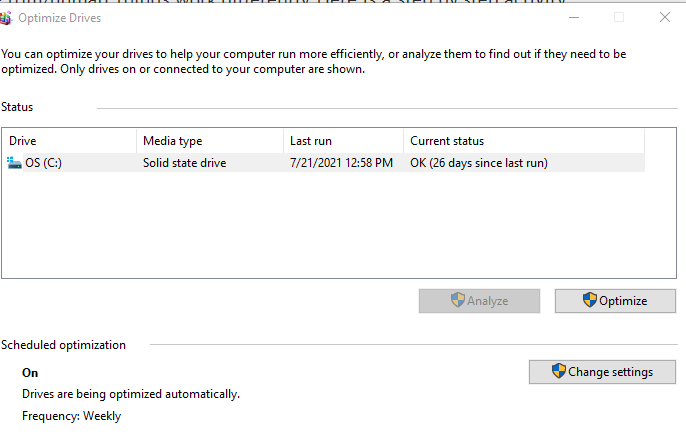
Once enabled, VMs need to be rebooted. Once rebooted if it’s a windows VM open disk defragmented app and run optimize.
To view if trim & unmap is running, go to an esxi host in the cluster (preferably the one that’s hosting the respective VM), and under the performance tab, view the Trim/Unmap throughput traffic, an increase in unmap traffic will be visible.
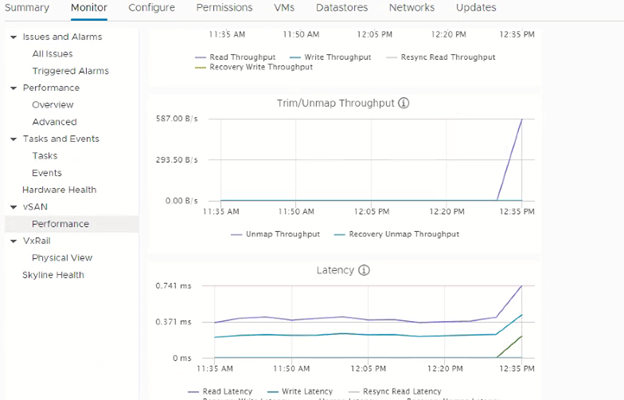
Once done, the VM’s space utilization on vSAN will go down significantly.. It can take time depending on the data to be trimmed.
C- How to automate it ?
Well, on newer versions of windows server its automated by default, to double check it . On windows, run the command below on windows server and the value should return 0.
Get-ItemProperty -Path "HKLM:\System\CurrentControlSet\Control\FileSystem" -Name DisableDeleteNotification
What if there was a snapshot ??
UNMAP commands will not process through the mirror driver. This means that snapshot consolidation will not commit reclamation to the base disk, and commands will not process when a VM is being storage vMotioned. To compensate for this, the asynchronous running of reclamation performed after the snapshot or migration is performed will be needed to reclaim these unused blocks. This may commonly be seen if using VADP based backup tools that open a snapshot and coordinate log truncation prior to closing the snapshot. One method to clean up before a snapshot is taken is to use the pre-freeze-script.
For Windows:
C:\Windows\pre-freeze-script.bat
For all other operating systems:
/usr/sbin/pre-freeze-script
Running the fstrim or DiskOptimize before a snapshot will clean out any deleted files that happened during a previous backup window
Troubleshooting:
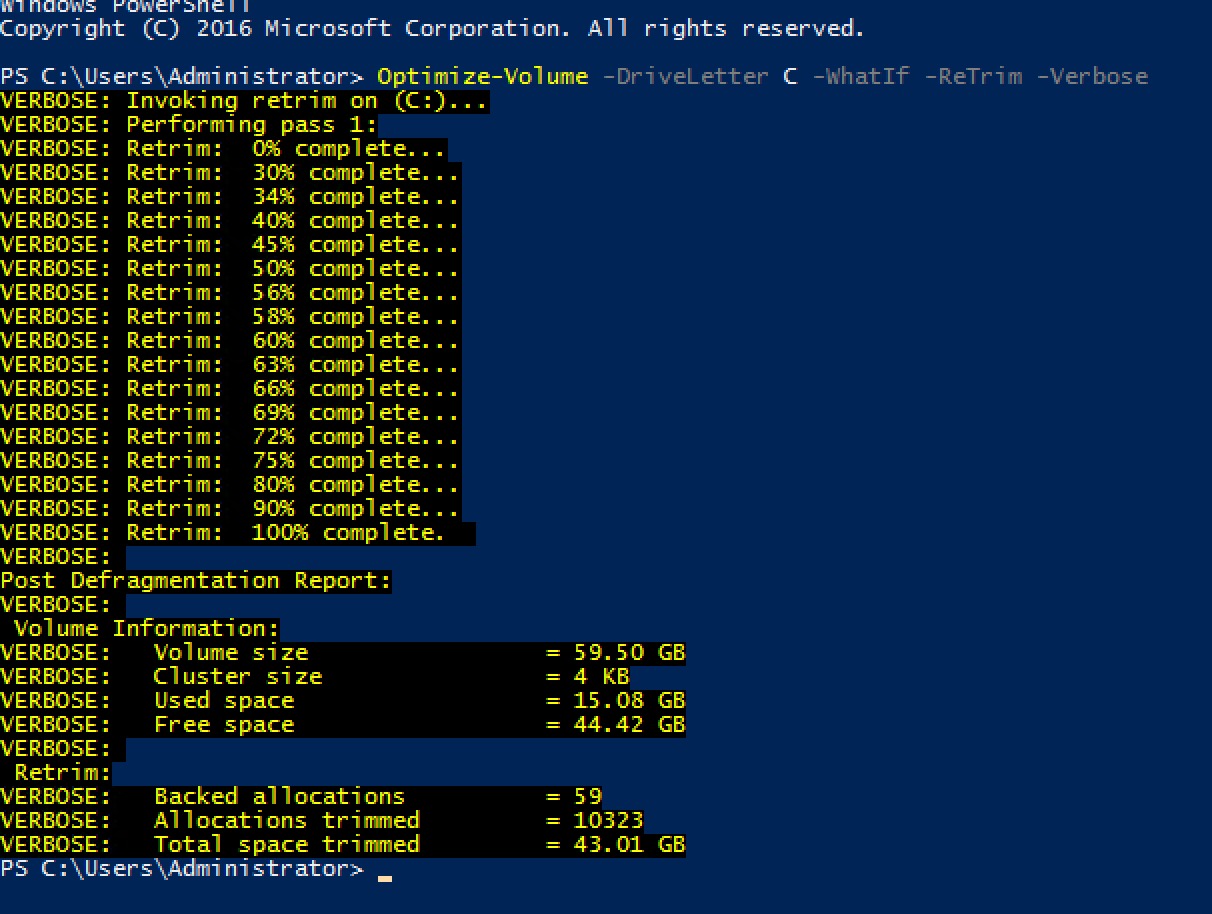
On windows to ensure OS is sending command to storage to reclaim storage space , execute the command below command
Optimize-Volume -DriveLetter H -ReTrim -Verbose
On esxi we can execute the below command to verify if unmap got sent to the vmware layer. In the below picture highlighted shows number of unmaps..
vsish -e get /vmkModules/vsan/dom/compmgrStatsForPerfSvc | grep -i unmap
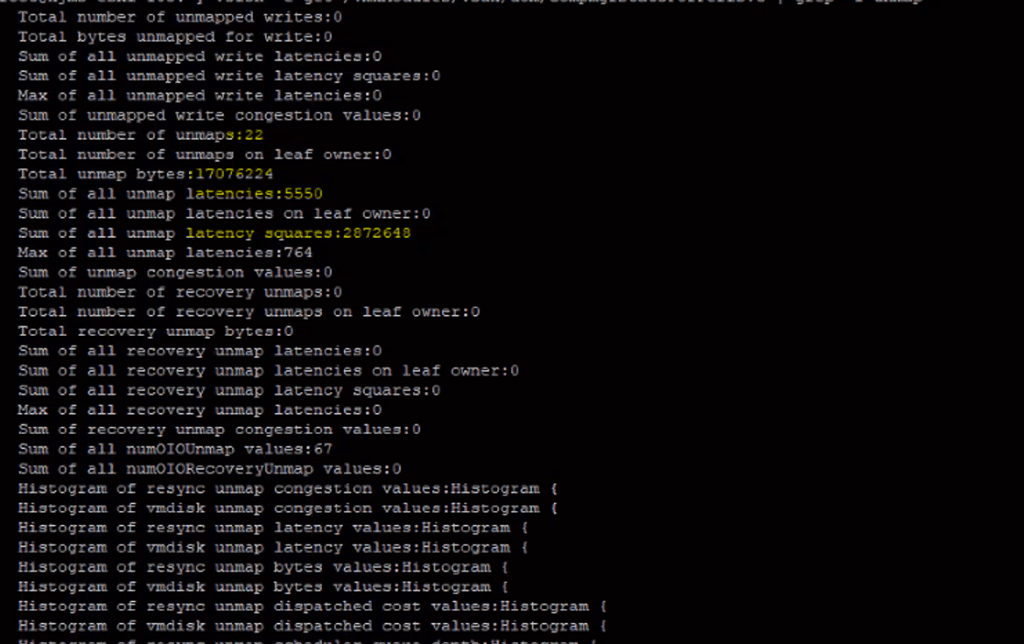
That’s it an optimal way to reclaim storage space to vsan and make VSAN a cost effective storage solution. For more details follow the article from VMware below:
https://core.vmware.com/resource/vsan-space-efficiency-technologies#sec6535-sub1
 Cloud and Security