In the wake of a DDoS attack originating internally within a network, swift identification of the source is crucial for mitigating the threat and restoring normal operations. Leveraging Wireshark as an analysis tool can be instrumental in this process.
Upon encountering suspicious network activity, initiate Wireshark to capture packets for analysis. You can achieve this by connecting your machine to the network(LAN preferred, a TOR or Core switch, or on a switch closest to the DC preferred.) It will create a .pcap file
Identification Method 1:
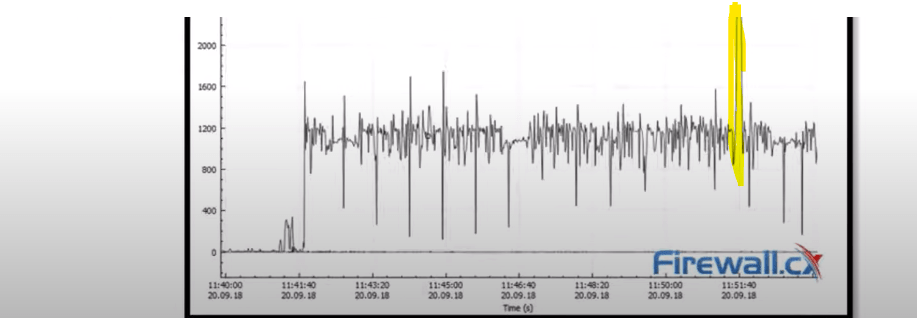
Begin by examining the I/O graph, which illustrates the flow of packets over time. Anomalies such as a sudden spike in outgoing packets can indicate a potential DDoS attack.
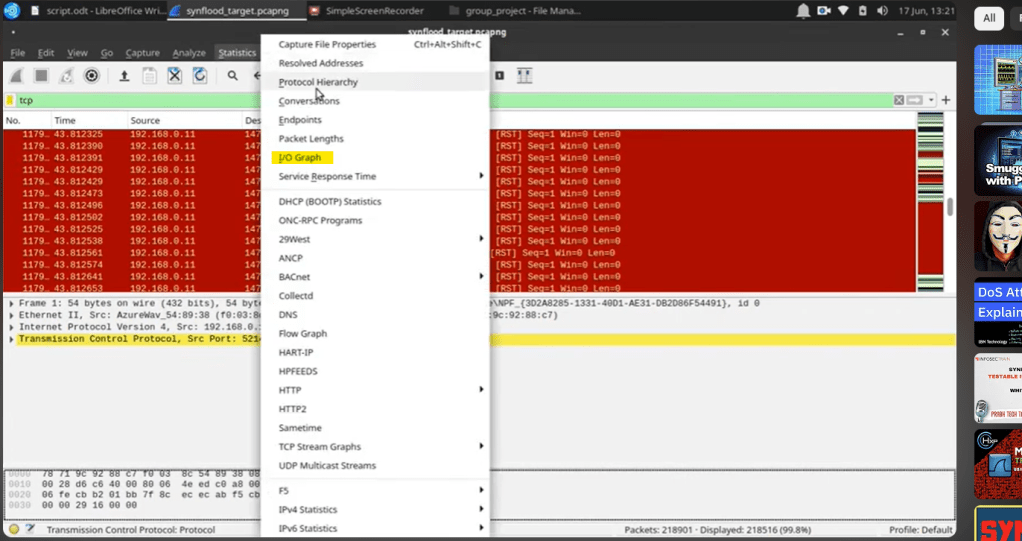
Continue to filter the captured packets. Wireshark pcap files can have overwhelming data, and it’s essential to file it effectively so that we can get to our identification of the incident. Therefore, use the below flags to filter traffic.

Moreover, If we use the following display filter to display syn/ack packets there will be a huge discrepancy between them and the previous filter packets

What is a SYN flood Attack?
A SYN flood attack is a type of Distributed Denial of Service (DDoS) attack designed to overwhelm a target server by flooding it with a high volume of TCP SYN (synchronize) packets, exhausting its resources, and rendering it inaccessible to legitimate users.
Here’s how it works:
When a client initiates a TCP connection with a server, it sends a SYN packet to request communication. The server then responds with a SYN-ACK packet to acknowledge the request and awaits a final acknowledgment (ACK) from the client to establish the connection.
In a SYN flood attack, the attacker exploits the TCP three-way handshake process by sending a flood of SYN packets to the target server, each imitating a legitimate connection request. However, the attacker either sends spoofed IP addresses or does not respond to the server’s SYN-ACK, leaving the server hanging, and waiting for the final ACK that never arrives.
As a result, the server’s connection queue becomes filled with half-open connections, consuming its resources and preventing it from responding to legitimate connection requests. This effectively denies service to legitimate users, leading to website downtime or service unavailability.
Identification Method 2:
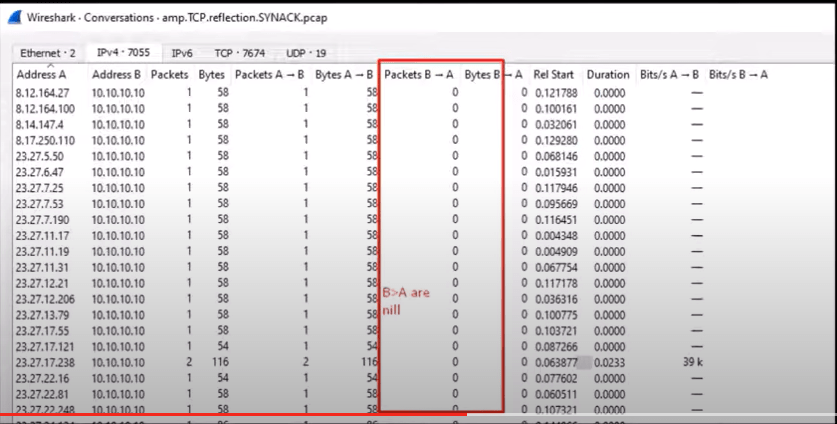
Coming back to the traffic analysis, based on the filters chosen on the earlier .pcap file; Choose statistics and Select a conversation from the Wireshark menu. If there are several Packets targeted on one IP from different Source addresses and no reply back, it indicates a DDoS attack.
Identification Method 3:
Another method is to scrutinize the source and destination counts within Wireshark. A disproportionate ratio of outgoing packets from a specific internal IP address towards a single external destination suggests the presence of a malicious actor within the network. By isolating the source IP, you can pinpoint the attacker

Now that the attacker and the target are identified, neutralize the attacking devices. Identify what’s causing the DDoS, an app or an insider threat tool, or a software bug, whatever it could be. Scan the whole network for similar threats or behavior and act accordingly.
Below is what can be followed as a precaution to avoid such incidents in the future.
- Benchmarking: Identify baseline traffic in your network infrastructure. For an intranet, identify the peak utilization hours, usage minimum, and maximum along with the burst traffic duration during normal and heavy business hours. Review those baselines frequently and use updated values.
- Inventory devices and users.
- Rate Limiting: Implementing rate-limiting measures on network devices can help restrict the number of connection requests from individual sources, making it harder for attackers to overwhelm the server.
- Firewalls and IDS/IPS: Configuring firewalls to filter out suspicious SYN packets and deploying Intrusion Detection Systems (IDS) or Intrusion Prevention Systems (IPS) can help detect and mitigate SYN flood attacks in real-time.
 Cloud and Security